Research-led product guide
WOLFBOX G900 Pro Mirror Dash Cam: the answer in context
The best mirror dash cam for a particular vehicle is the one that fits safely and solves a real visibility problem—not simply the model with the longest feature list. A wide digital rear view can help when cargo, passengers, a camper shell, a small rear window, or a trailer blocks the optical mirror. Start with physical fit and camera placement, then compare recording quality, footage access, storage, parking power, and total installed cost. Even strong electronics are a poor choice if the display blocks a visor or the rear camera cannot provide the view you need.
- First measurement
- Factory mirror width, mirror stem, both sun visors, controls, sensors, and front-camera clearance
- Rear-view decision
- Interior glass mounting for protection or exterior mounting for a clearer path around blocked cabins
- Ownership choice
- Local card workflow or Wi-Fi/app access for frequent clip review
- Total project cost
- Camera, suitable storage, hardwire kit, extension cable, mount accessories, and installation
Our view is based on published specifications, manufacturer documentation, and category research. Where we have not performed hands-on testing, we do not imply that we have.
Start with the problem
Buy the digital-mirror format for visibility—not because the screen is large
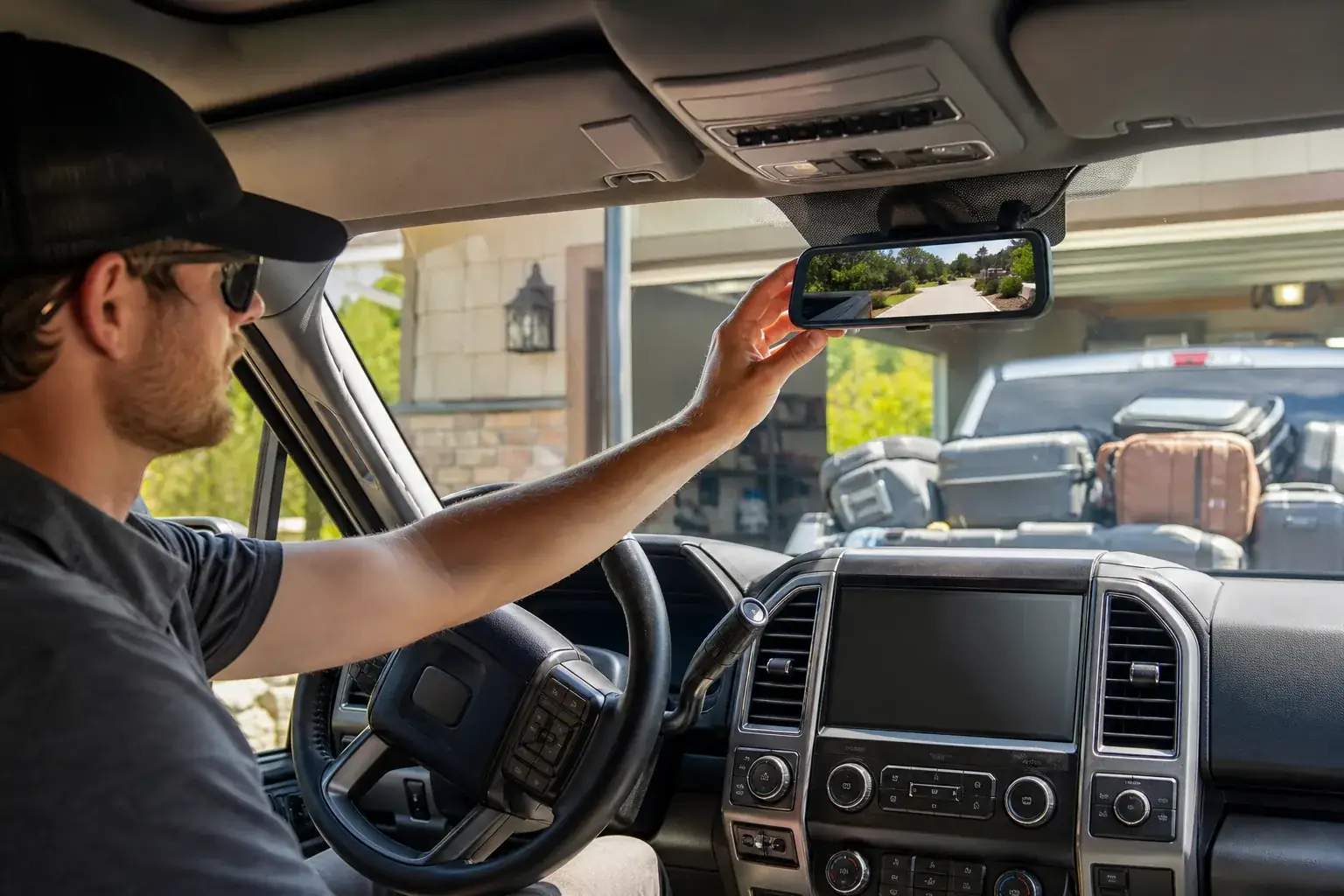
A mirror dash cam places a display over or in place of the factory rear-view mirror and shows a live rear-camera feed while recording the road. The format can be especially useful in pickups with camper shells, vans, RVs, cargo-loaded SUVs, vehicles with small rear windows, and cabins where passengers or headrests often block the optical view. It can also combine the rear-view interface with front-and-rear incident recording.
The same design changes a familiar driving control. A digital image has camera perspective, screen brightness, processing, power, lens cleanliness, and weather dependencies. Some drivers adapt immediately; others prefer the depth cues and instant response of an optical mirror. Keep every legally required mirror and direct visual check in the routine, and confirm that the display can be turned off or used reflectively only as documented for the exact model.
If the rear window is already clear and the only goal is incident recording, a conventional two-channel dash cam may be smaller, less visually intrusive, and easier to position. The mirror format earns its installation work when the live rear view itself is valuable every day.
- Strong use case: blocked or limited rearward visibility
- Weaker use case: recording only, with no need to change the mirror interface
- Test whether the digital perspective feels comfortable during the return window
Measure before ordering
Mirror, visor, sensor, and front-lens clearance determine compatibility
Measure the factory mirror body in its normal driving position, then move both sun visors through their full range. Check the mirror stem, buttons, automatic-dimming hardware, garage-door controls, overhead console, windshield camera housing, and any driver-assistance sensors. A wide display should sit securely without hiding required controls or forcing the front lens behind the original mirror housing.
Strap-on designs are convenient when the factory mirror shape and mounting bands align well. Replacement or OEM-style brackets can produce a cleaner installation on supported vehicles but introduce another compatibility check. Do not assume that a bracket labeled universal fits the vehicle’s mirror mount or preserves factory electronics. Confirm model-specific fit and return terms.
WOLFBOX currently documents 12-inch displays for both the standard G900 and G900 Pro. That shared size means upgrading to the Pro does not remove the need to measure. The best electronics package is still the wrong choice when a visor cannot lower, a sensor is covered, or the front camera cannot see cleanly past the factory housing.
Rear-camera placement
Choose the camera position for the view you need and the environment it must survive
An interior camera mounted against rear glass is protected from rain, road spray, theft, and direct impact. It usually simplifies cable entry and service. Its image depends on the glass: dark tint, defroster lines, dot-matrix borders, reflections, a dirty window, cargo, and whether the rear wiper clears the lens area can all matter.
An exterior camera can see around a blocked cabin and avoid heavy tint, making it attractive for pickups, campers, vans, and some RV installations. It adds exposure to water, salt, dirt, vibration, fastening, cable-entry sealing, corrosion, and cleaning. A low plate-area mount may help with reversing but can give a different traffic view from a high rear-window position.
Hold the camera temporarily at candidate positions and inspect the live feed with normal cargo, the hatch closed, and the vehicle on level ground. Check the horizon, adjacent lanes, bumper reference, glare, rain behavior, night reflections, and whether a spare tire, hitch load, open tailgate, or camper blocks the view. Reverse guidelines are an aid, not a replacement for the vehicle’s original safety systems and direct observation.
- Interior: protected and serviceable, dependent on glass and cargo
- Exterior: clearer route around blocked cabins, greater weather and installation demands
- Plan cleaning access as part of the mounting decision
Recording and footage access
Resolution matters, but sensor, placement, storage, and retrieval complete the system
Published 4K language does not by itself establish usable detail in motion or at night. Sensor, optics, compression, exposure, windshield condition, camera angle, lighting, speed, and distance all affect whether a plate or event can be understood. Look for representative footage in conditions similar to the intended driving and confirm the simultaneous front-and-rear recording modes rather than combining the maximum number from each channel.
Storage determines how much history exists before loop recording overwrites older files. Check supported card type, endurance guidance, capacity, formatting, channel count, resolution, protected-file behavior, and whether a card is included. Current WOLFBOX pages conflict on some standard G900 capacity guidance, so the manual supplied with the exact unit should control the final card choice.
Connectivity changes the ownership workflow. WOLFBOX lists Wi-Fi, app access, and voice control for the G900 Pro, while its current comparison lists those functions as unsupported on the standard G900. App access can make local clip review and transfer easier, but it is not automatic cloud backup. Practice protecting and copying one file before relying on either workflow.
Cable routing and parking power
The rear cable and hardwire plan belong in the budget before checkout
Trace the complete rear-camera cable route rather than measuring a straight line from mirror to bumper. Account for trim transitions, service loops, liftgate or tailgate movement, weather seals, and the chosen camera position. Keep wiring away from airbag deployment paths, sharp edges, seat tracks, hot surfaces, hinges, latches, and places future service work will disturb. Long pickups, campers, and RVs may need a verified extension cable and connector.
WOLFBOX’s current G900 Pro page documents a 20-foot rear-camera cable and a truck/camper package with an additional 10-foot extension. Package contents can change, so confirm the exact bundle. Its current bundles also state that no microSD card is included. These details affect the real installed cost more than a temporary headline discount.
Parking monitoring usually requires compatible continuous-power hardware. Verify the exact hardwire kit, vehicle fuse layout, constant and accessory circuits, ground, cutoff behavior, battery condition, and restrictions for hybrids, EVs, stop-start systems, or intelligent battery sensors. Professional installation is appropriate when airbags, trim removal, fuse selection, reverse-light wiring, or vehicle electronics are uncertain.
- Measure the routed path through every moving section
- Keep cables outside all airbag deployment zones
- Treat parking mode as a separate electrical project
- Verify the system still enters normal vehicle sleep behavior after hardwiring
WOLFBOX G900 vs G900 Pro
Choose the G900 for the essential mirror workflow and the Pro for repeated connected use
The standard G900 is the simpler route to a 12-inch front-and-rear mirror-camera system. Current WOLFBOX information lists 4K front and 2.5K rear recording, GPS, loop recording, reversing assistance, and parking-monitor support with compatible hardware. It does not list Wi-Fi, app control, or voice control, so important footage generally follows a local screen or memory-card workflow.
The G900 Pro adds newer named imaging hardware, 5.8GHz Wi-Fi and app access, voice control, and other documented processing changes. Those features are easiest to justify when clips are reviewed or shared frequently, phone-based setup matters at the vehicle, or voice commands solve a real control problem. We have not independently compared image quality, transfer speed, heat behavior, or long-term reliability.
For either model, compare the exact ASIN, bundle, rear-camera type, cable length, GPS hardware, memory card, hardwire kit, bracket, warranty, seller, and return period. A family name such as “G900 series” is not enough to prove that a listing contains the hardware or accessories discussed here.
First-week checklist
Verify the system after installation rather than assuming recording has begun
Before closing trim, temporarily power the unit, format compatible storage, record both channels, and play back files. After final mounting, set date, time zone, loop length, sensitivity, audio preference, display brightness, GPS, and parking behavior intentionally. Confirm the view in daylight and darkness and make sure the screen does not block controls or distract the driver.
Recheck mounts, cable movement, timestamps, card errors, camera angle, and saved-file workflow after the first week and after the first temperature swing. Repeat the check after windshield, hatch, battery, trim, or rear-body service. A maintained midrange camera is more dependable than a premium installation whose card, lens, angle, or power behavior is never inspected.
Frequently asked questions
What buyers ask about WOLFBOX G900 Pro Mirror Dash Cam
Are mirror dash cams better than regular dash cams?
They are better when a live digital rear view solves a real visibility problem. A conventional two-channel camera can be smaller and simpler when recording—not changing the mirror experience—is the main goal.
Will a 12-inch mirror dash cam fit every vehicle?
No. Measure the factory mirror, both visors, controls, sensors, front-camera clearance, rear-camera route, and driver sight line. A secure attachment does not guarantee safe or convenient fit.
Should the rear camera go inside or outside?
Interior mounting offers weather protection and easier service but depends on clear glass and cargo. Exterior mounting can see around blocked cabins but requires weather-resistant placement, sealed cable entry, cleaning, and secure fastening.
Does parking mode work without a hardwire kit?
Do not assume it does. The WOLFBOX G900 family documents parking monitoring with compatible hardwire equipment. Verify the exact kit, power circuits, cutoff behavior, battery condition, and vehicle requirements.
What is the main difference between WOLFBOX G900 and G900 Pro?
The Pro adds newer named sensors, Wi-Fi and app access, and voice control. The standard G900 keeps the core 12-inch front-and-rear mirror-camera format with a simpler local footage workflow.
Primary sources checked
Official documentation used for this guide
Specifications, software, bundles, warranties, and compatibility can change. These primary sources were checked while preparing this page; confirm the current information for the exact model before purchase.
Interactive vehicle-fit pre-check
Will a mirror dash cam fit your vehicle?
Check the factory mirror, visors, camera view, rear-cable route, airbags, and parking-power plan before comparing models.
Do not route power or rear-camera cables across an airbag deployment zone. Check the vehicle documentation or use a qualified installer.
Compare WOLFBOX G900 and G900 Pro →This pre-check cannot approve an installation. Confirm the exact product manual, cable length, package contents, required mirrors, and local driver-sight-line rules. Use a qualified installer when trim, airbags, fuse selection, reverse-light wiring, or vehicle electronics are uncertain.
Product links